We built this for ourselves — and use it every day.

Hermod brings LTL freight and UPS parcel shipping into Shopify, on your own Worldwide Express account. Quote, book, print the paperwork, and watch tracking flow back — without re-keying a single order.

Coming to the Shopify App Store Read the 10-minute Quick Start →

You shouldn't have to go through Hel to ship a package.

LTL freight + parcel, side by side Your WWEX account, your negotiated rates Runs inside Shopify admin
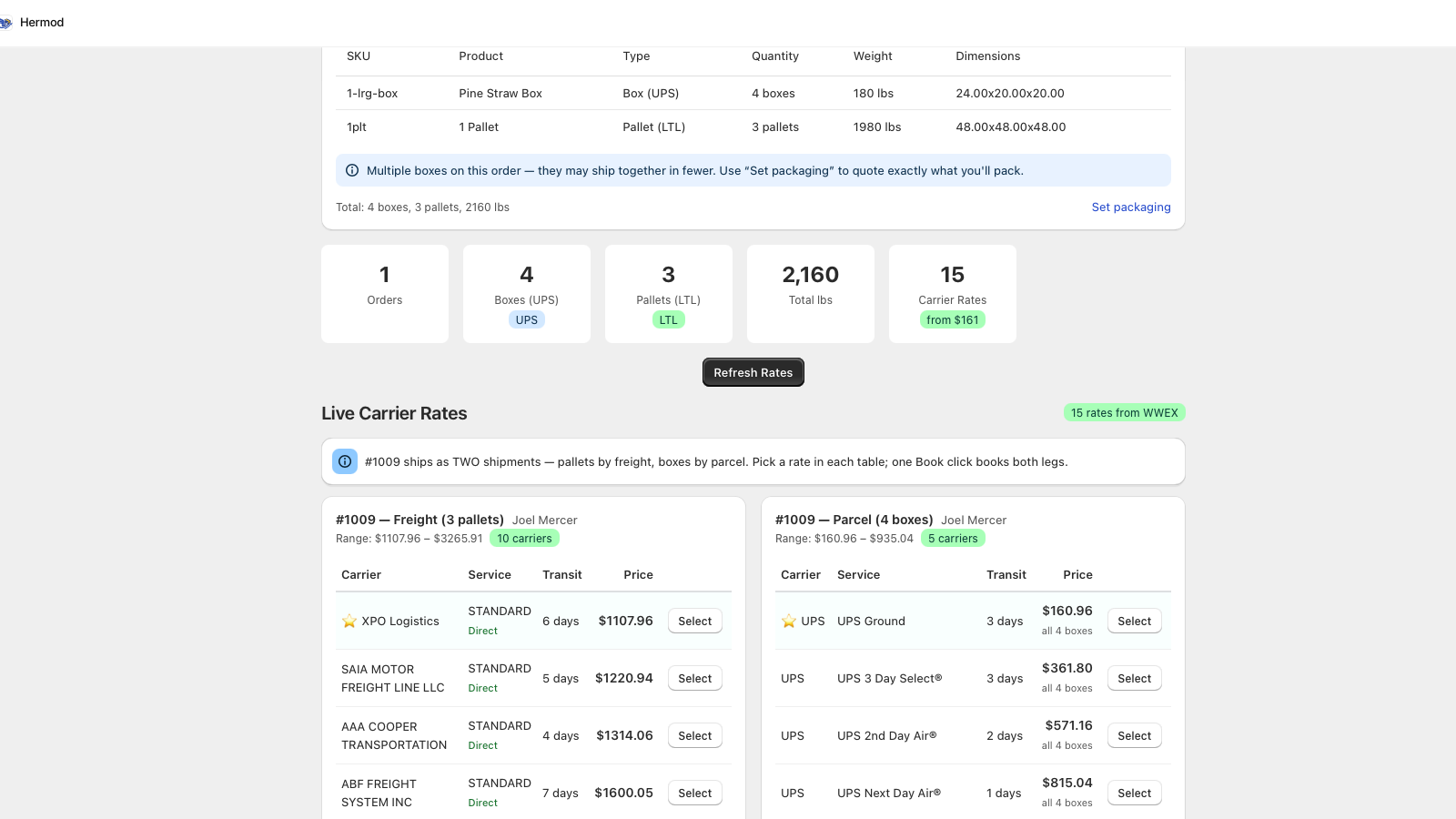
Hermod's live carrier rates screen: one order rated as freight and parcel side by side — ten LTL carriers for the pallets, five UPS services for the boxes
One order, two shipments: pallets rated by freight, boxes by parcel — live from your own WWEX account. Real app, fictional data.

The gap

Shopify never learned to speak freight.

Shopify handles parcel beautifully. The moment an order needs a pallet, a bill of lading, and a freight class, merchants drop out of the admin and into a broker portal, a spreadsheet, and a lot of copy-paste. Hermod closes that loop.

Today Booking a freight order by hand

  1. Open the Shopify order, read the line items
  2. Work out pallets, weight, and dimensions
  3. Log into the broker portal in another tab
  4. Re-key the ship-to address, class, and NMFC
  5. Compare quotes, book, download the BOL
  6. Go back to Shopify, paste the tracking number, fulfill
4–5 minper order, every order, with re-keying errors baked in

With Hermod The same order

  1. Open the order in Hermod — pallets already calculated
  2. Click Get Rates
  3. Pick a rate and click Book Shipment
< 1 minBOL generated, tracking written back, fulfillment created
450+orders shippedFreight and parcel, through Hermod, on our own orders
June 2026running liveIn our own warehouse, every shipping day since
~4 minsaved per orderA pallet-and-box order books in under a minute — measured at our own pack station, not modeled
0addresses re-keyedThe order is the shipment — nothing typed twice

We built Hermod for our own pine straw business and use it every shipping day. These are our numbers, from our warehouse — updated as they grow.

How it works

Set it up once. Then it's three clicks.

Everything Hermod needs — your carrier credentials, your warehouse, your freight class, how your products pallet up — lives in Settings and is entered one time. After that, shipping an order is the same three motions every day.

1

Open the order

Hermod reads the line items and applies your packaging map — how many units fill a box, how many boxes fill a pallet. The shipment is rateable before you touch anything.

2

Get rates

Live LTL and parcel quotes come back from your own carrier account in seconds, side by side, with transit times and pickup dates.

3

Book

One click issues the booking, returns a PRO number, generates the BOL, creates the Shopify fulfillment, and writes tracking back to the order. The customer's status updates on its own.

Walk through setup Roughly ten minutes, once.

Inside the app

Built on Shopify Polaris, so it doesn't feel bolted on.

Hermod is an embedded app — it looks and behaves like the admin around it. Every screen below is a real capture from the app (the data is fictional).

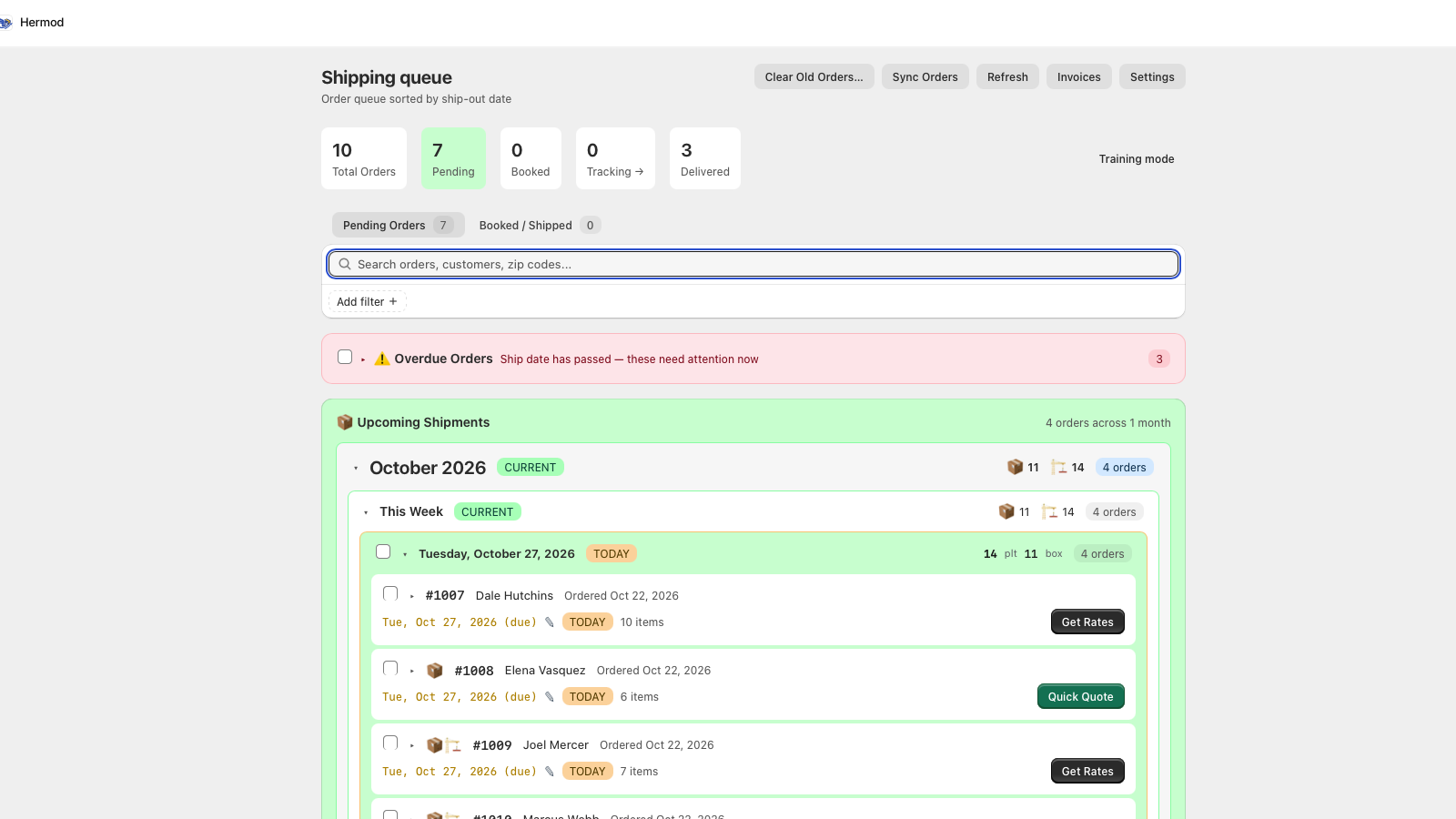
Hermod's shipping queue: orders grouped by ship-out date with pallet and box counts, overdue orders flagged, and Get Rates on each row

A queue that knows what ships today

Every unfulfilled order, sorted by ship-out date and grouped by day — with pallet and box counts already calculated, and overdue orders flagged in red before they become phone calls. Get Rates is right on the row.

Live carrier rates for one order split into a freight shipment and a parcel shipment, with carrier, service, transit, and price columns

Freight and parcel, rated together

An order that's part pallets, part boxes ships as two legs — LTL carriers quoted for the freight, UPS services for the parcel, side by side. Pick a rate in each table; one Book click books both.

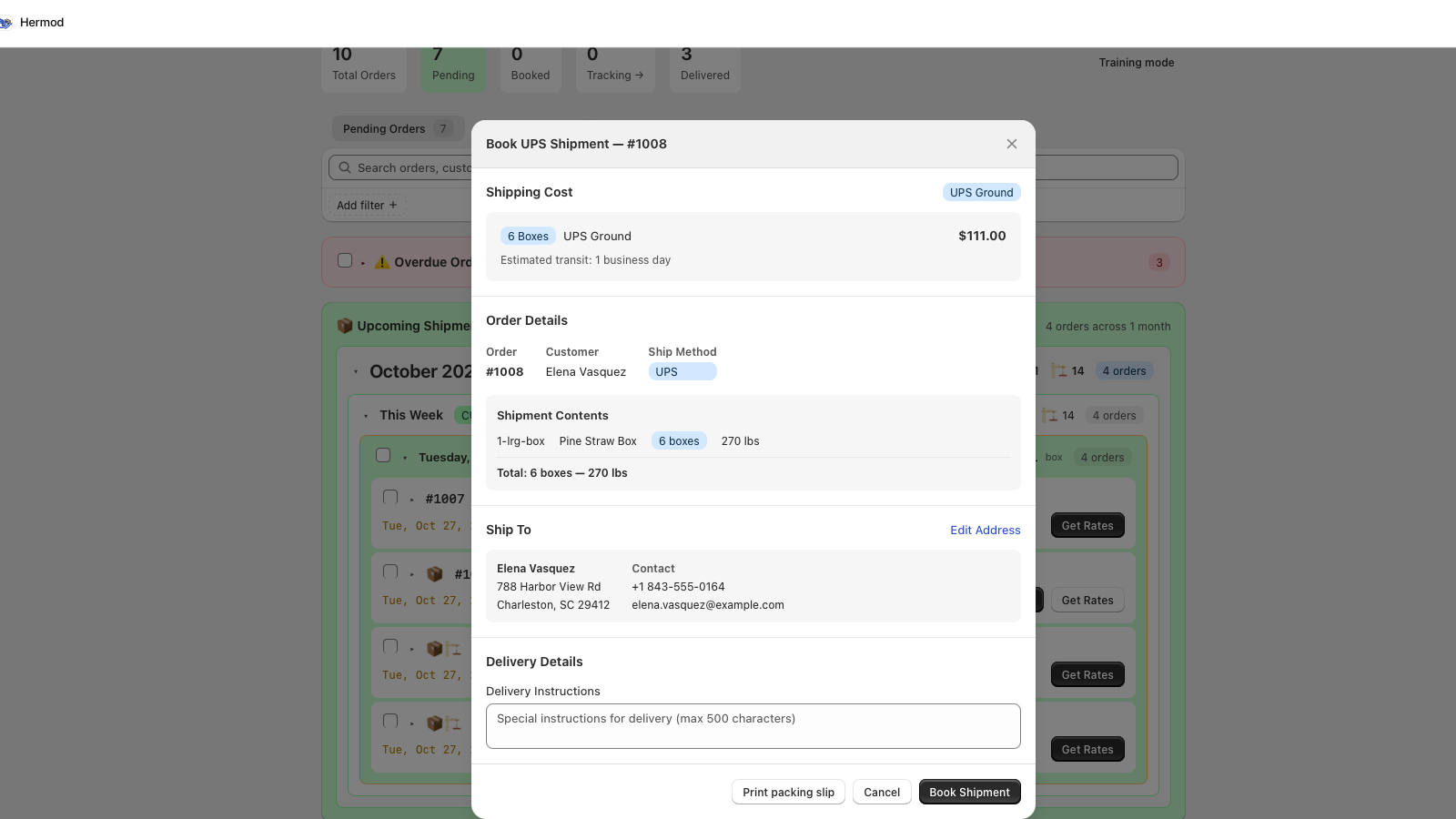
Hermod's booking dialog for a UPS shipment: shipping cost, shipment contents, ship-to address, delivery instructions, and the Book Shipment button

Booking without the portal

Confirm the cost, contents, and ship-to — straight from the order, nothing re-keyed — add delivery instructions, and click Book Shipment. The packing slip prints from the same dialog.

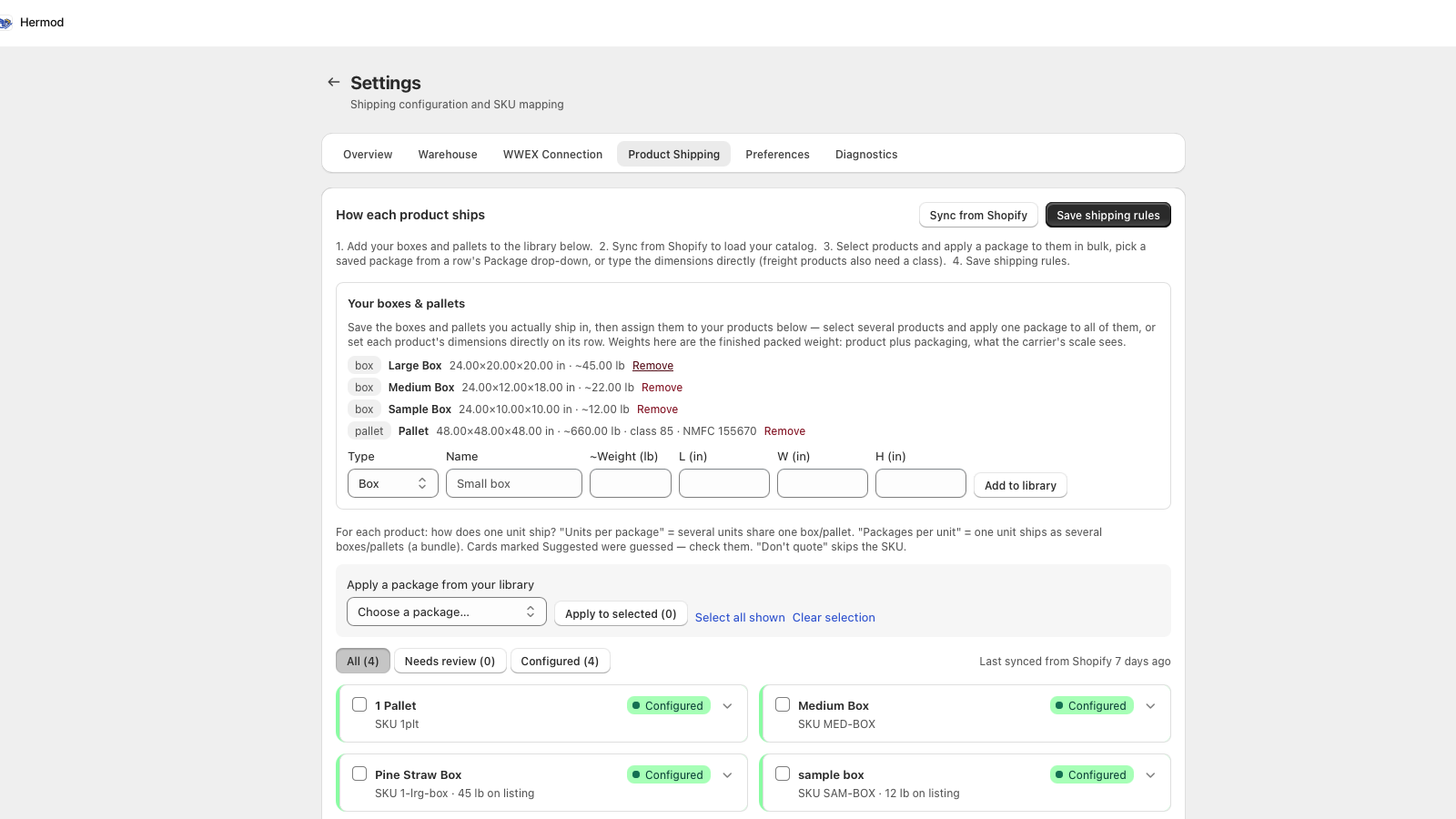
Product Shipping settings: a library of saved boxes and pallets, and one card per product showing its configured shipping rule

Tell it once how your products ship

Save the boxes and pallets you actually ship in, then assign them to products — in bulk or per SKU, with freight class and NMFC on the freight ones. This map is what turns an order's line items into a rateable shipment automatically.

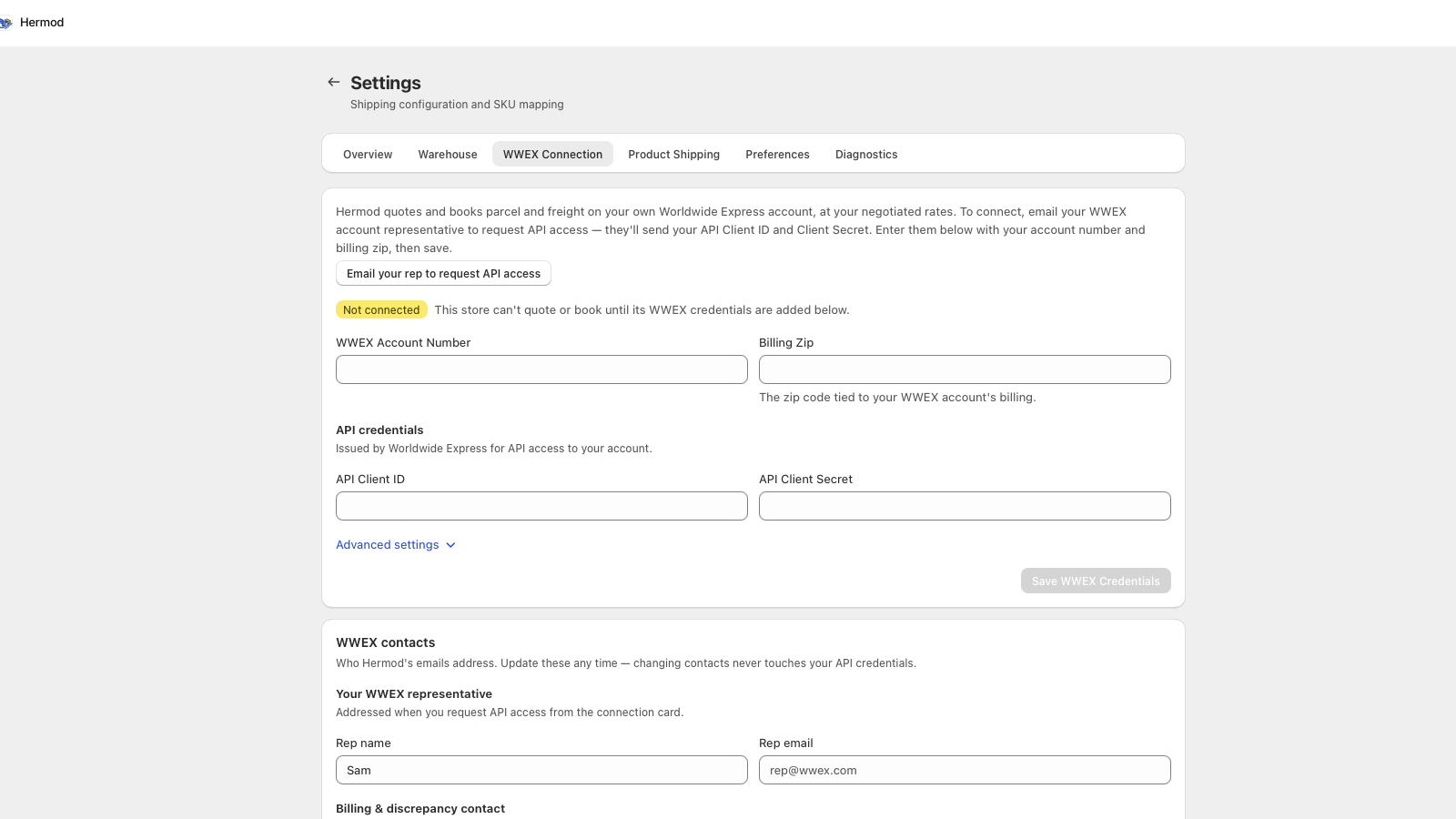
WWEX Connection settings: fields for WWEX account number, billing zip, API client ID and secret, plus WWEX contact entries

Your account, connected in one screen

Enter the credentials WWEX issued you — account number, billing zip, API client ID and secret — and save. There's even a button that pre-fills the email to your rep requesting API access.

What's in it

Everything the freight step actually needs.

Not a rate calculator. The whole job — quoting, booking, paperwork, and the write-back into Shopify that stops you touching the order twice.

Live LTL and parcel, side by side

Real-time quotes from your own carrier account. Freight and parcel are rated together so you can see, for once, which one is actually cheaper on this order.

Booking without the portal

Pick a rate, confirm the details, and Hermod issues the booking, returns the PRO, and files the pickup — no second portal, no re-keying the destination address.

BOL and documents generated

Bill of lading, shipping labels, pallet labels, and packing slips — produced at booking, printable straight from the order. Correct the first time, because the data came from the order.

Tracking written back to Shopify

Fulfillment created, tracking number and carrier pushed to the order automatically. The customer's status updates without anyone opening the order again.

Pallet math, done for you

Your packaging map turns line items into boxes and pallets. Orders over five pallets split evenly across bookings — seven becomes four and three — and each leg is rated properly.

A queue sorted by ship-out date

Orders line up by when they ship, not when they were placed — grouped by day, with today's work on top and overdue shipments flagged before a customer has to call.

Insurance and accessorials

Declared value, liftgate, residential, and handling charges are priced into the quote — so the number you book at is the number you get invoiced.

Cancel without a phone call

Cancel a booking from the same screen you made it on. The Shopify fulfillment and tracking are unwound with it.

A tracking page that runs itself

Every booked shipment's status, checked automatically — in transit, out for delivery, delivered, exceptions flagged in the app. Delivered orders file themselves away.

Invoice reconciliation

The hours you spend reconciling carrier invoices become minutes.

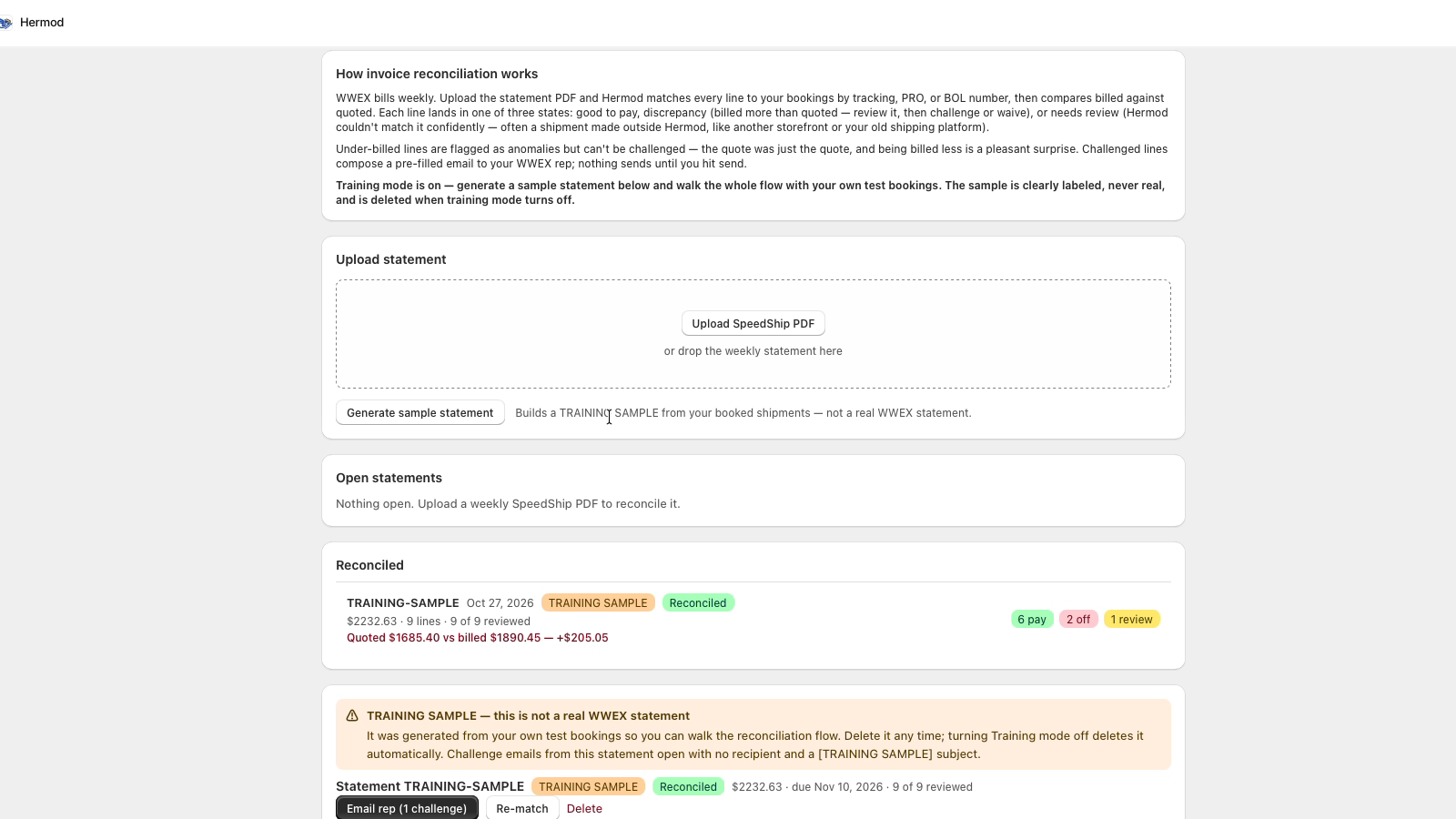
Upload the weekly carrier statement. Every shipment on it is matched to its order and to the quote you booked at, discrepancies are flagged, and the dispute email to your rep is written in one click.

Hermod's invoice reconciliation page: statement upload, and a reconciled statement showing quoted versus billed totals with pay, discrepancy, and review counts
The Invoices page, reconciled statement and all. Real app — shown in training mode, where Hermod generates a clearly labeled sample statement so you can walk the flow before a real one arrives.

What the first statement found

The day we turned reconciliation on, it caught a wrong box spec quietly billing 4 extra dim-pounds on every package — plus $285 of "LengthGirth" surcharges on boxes that measured three inches under the threshold. About $500 on one statement, found in the time it took to upload the file.

We'd been reconciling by hand before that. You don't catch a surcharge pattern by hand. You catch the big stuff and eat the rest.

  1. Upload the statement — the weekly statement PDF from your carrier, as-is.
  2. Every line matched — paired to its booking by tracking, PRO, or BOL number, and compared against the quote you booked at.
  3. Every line lands in one of three states — good to pay, discrepancy (billed more than quoted — review it, then challenge or waive), or needs review. Under-billed lines get flagged too; being billed less is a pleasant surprise.
  4. Dispute drafted — challenged lines compose a pre-filled, itemized email to your WWEX rep. Nothing sends until you hit send.

Why it exists

Built on our own loading dock.

Before Hermod was software, it was the dock — packing boxes in the heat, building pallets, and knowing exactly what our product looks like when it leaves the warehouse.

Then the carrier side: freight disputes, reclasses, box overages, UPS changing the Additional Handling size thresholds out from under us. Customers calling about order status. Missing packages. Orders held at terminals. Damaged packages. Missing pallets — yes, it's crazy, but it does happen.

And the daily grind behind all of it: one app for orders and ship-out dates, transferred to an Excel spreadsheet, then keyed by hand into SpeedShip. Needless to say, we spent a lot of time just processing and shipping orders.

This is the life we've lived. Every feature in Hermod is a scar with a solution attached — nothing speculative, all of it lived first.

"Every problem or bottleneck has a solution — you just have to look in the right places to find it."

The push-pin wall of BOLs

Orders too big for one truck meant pre-printed BOLs pinned to the wall, waiting for their day. Now split shipments schedule themselves in the queue, and the second booking happens when it should.

The customer knew before we did

Stalled freight used to announce itself by phone — a customer calling about a pallet we thought was moving. Now stuck shipments raise an alert in the app before the phone rings.

The vanished second BOL

Two shipments, one order, and the second one's paperwork gone when we needed it. Every shipment now carries its own tracking, its own documents, its own status.

The $500 statement

Hours of manual invoice reconciling became one upload and a summary band — and the very first statement paid for the feature. The full story is above.

We tried everything else first

Other shipping software — lots of it — never really fit our unique needs. So we built Hermod from the perspective of a fellow business owner who has felt the pain points of parcel and freight shipping firsthand. We built it to solve our own shipping problems, and we think you might have had a similar experience.

Your account, your rates

Hermod doesn't resell freight. It uses your credentials.

You bring your own WWEX account and Hermod books on it. Your negotiated rates, your carrier relationship, your invoices. Nothing is marked up in the middle, because there is no middle.

  • Hermod requests only orders, fulfillments, and product details
  • Customer payment information is never requested
  • Each store installs independently — data is scoped to your shop
  • Credentials are encrypted at rest and can be disconnected at any time
The WWEX Connection settings screen where merchants enter their own account number, billing zip, and API credentials

Pricing

What Hermod costs.

Freight spend stays between you and your carrier. Hermod charges for the software only.

Hermod

$119/month

or $1,190/year · 21-day free trial · billed through Shopify · cancel anytime

Everything: live LTL and parcel rates, one-click booking, BOL and label generation, automatic tracking, invoice reconciliation, cancellation. One plan — no tiers, no per-label fees, no markup on your freight.

The trial is 21 days on purpose — enough time to request your API credentials from your Worldwide Express representative and truly see how Hermod can impact your business.

Questions

Before you install.

Do I need a freight account already?

Yes. Hermod books on your WWEX account using your negotiated rates — it isn't a broker and doesn't resell freight. If you don't have an account yet, opening one is the first step; see Getting your WWEX credentials.

Does it replace my parcel setup?

It doesn't have to. Hermod rates parcel alongside freight so you can compare on the orders where it's a real question — a heavy multi-box order that might go either way. Orders that are obviously parcel can keep going through whatever you use today.

What if my products don't pallet up the same way every time?

Set each product's standard case once in Settings → Product Shipping. For the odd order that packs differently, set packaging on that order before you quote — a per-order override that beats every default.

Can I ship from more than one warehouse?

Hermod ships from one warehouse location per store today. Multi-location support is being researched — if you need it, tell us; real requests are what move it up the list.

What happens to an order I book by mistake?

Cancel it from the booked shipments screen — Hermod cancels the WWEX booking and unwinds the Shopify fulfillment and tracking with it. Do it before pickup; once a driver has been dispatched, acceptance is up to the carrier.

Which carriers can I book?

Whatever your WWEX account gives you — the LTL carrier panel WWEX quotes plus UPS parcel.

Ten minutes to set up. Then you stop thinking about it.

Install Hermod, connect your carrier account, and book the next freight order that lands — from the same screen you read it on.

Coming to the Shopify App Store Read the Quick Start

You shouldn't have to go through Hel to ship a package.